"Can you put together a sprint report?" usually means someone wants to know, in plain terms, whether the team did what it said it would do. That is a narrower question than it sounds: most of what ends up in a sprint report is either a burndown chart nobody reads closely or a bullet list typed from memory the morning of the review. Neither actually answers "did we deliver what we committed to," which is the question worth answering.
What a sprint report actually needs
Strip it down and a sprint report needs five things: what the team committed to at the start of the sprint (not what it ended up with: those are different numbers once scope moves); what actually got delivered; what carried over and why; how much scope changed after day one; and some sense of how long delivered work actually took, not just how much of it there was. A report that skips the day-one baseline and only shows the sprint's final contents cannot tell a delivery miss from scope creep: the two look identical from the outside unless the day-one snapshot was kept.
Sprint Summary: one team, one sprint
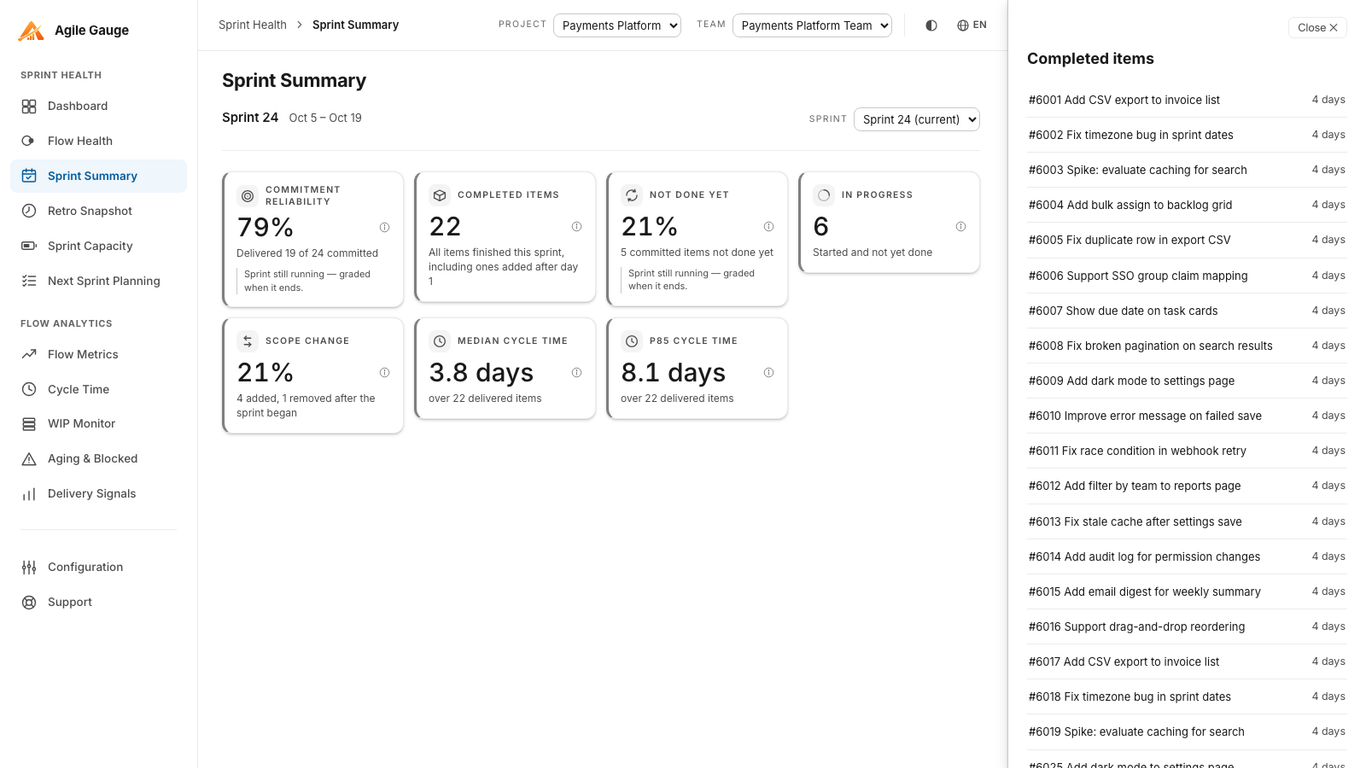
That is the shape of Agile Gauge's Sprint Summary view. It picks a sprint, the current one, if it has real activity, or it searches back through the last six finished sprints for one that does, and shows Commitment reliability, Delivered, Carryover, In progress, Scope Change, and both Median and 85th-percentile cycle time for that sprint's finished items, each as a clickable stat card.
Where "committed" actually comes from
Commitment reliability only means something if "committed" is measured honestly. Sprint Summary defines it as whatever the sprint held at the end of its first day: read from Azure DevOps' own history where that is available, and reconstructed by replaying each item's sprint-assignment history where it is not (common on data imported from elsewhere). The page states outright which method it used. If neither method can establish a real day-one snapshot, commitment reliability and carryover are not shown at all, rather than quietly defaulting to the sprint's current contents: a number built from "what's in the sprint right now" would read close to 100% no matter what actually happened, which is worse than no number at all.
Delivered-and-committed items divided by committed items gives commitment reliability as a percentage; items removed from Azure DevOps entirely are excluded from both sides, since a team should not be credited or penalised for work the business pulled. An item still counts as delivered if it closed up to 24 hours after the sprint's own end, since most teams close out the last item or two the morning after review. Scope change is (items added after day one plus items removed after day one) divided by total items: an item both added and later removed again counts in neither bucket.
Backing every number with the actual items
A sprint report number that cannot be questioned in the room is not worth showing. Every stat card in Sprint Summary opens the exact items behind it, Committed, Delivered, Carryover, In progress, and Scope Change's Added and Removed groups separately, and every item in those lists opens further into its own cycle time, its journey through your team's mapped workflow stages, and a link straight into Azure DevOps. "Carryover was high this sprint" turns into an actual list of which items carried and why, rather than a number someone has to take on faith.
When the report is for a meeting, not just a screen
Sprint Summary is built to be read on screen, one sprint switched at a time from a selector. When the report needs to go in front of a room: a sprint review, a retrospective | Agile Gauge's Retro Snapshot view covers similar ground with six graded KPIs against goals your team sets, plus a print layout sized to fit a handful of pages instead of a slide deck built by hand. The two views share the same underlying calculations, so a figure does not shift depending on which screen someone opened it from.
What this doesn't cover
A team's first-ever sprint, or a team with no sprint history at all, shows "no sprints yet" rather than invented figures. A very large sprint rebuilt from item history rather than read directly from Azure DevOps can occasionally miss recovering a handful of moves, which can make reliability read slightly more generous than it should: the page tells you when it used the reconstructed method, so that caveat stays visible rather than hidden. And every figure on the page is pre-filtered by whichever work item types your organization has configured to count toward metrics; until that is set, every type is included.
Getting there
Sprint Summary needs one thing set up first: your team's workflow-stage mapping in Configuration, so Agile Gauge knows which of your states count as started and which count as done. Once that is set, Sprint Summary reads your Azure DevOps history and builds the report the moment you open the screen: nothing to export, nothing to type in twice, and nothing that drifts out of date between one sprint review and the next.
Agile Gauge starts at $20 a month for up to 2 users. Start a 14-day free trial: full features, no card required.