"Say/do ratio" is a blunt but useful idea: of what the team said it would do, how much did it actually do? The trouble is that it is easy to measure dishonestly without meaning to. If "said" is read as whatever the sprint happens to contain by the time anyone checks, scope quietly added mid-sprint gets counted as if it were part of the original plan, and a team that took on extra work and finished most of it can look identical to a team that committed honestly and delivered everything. The number only means anything if "committed" is anchored to a real moment in time, the start of the sprint, not redefined after the fact.
Why the day-one baseline is the whole thing
Commitment reliability is delivered-and-committed items divided by committed items, where "committed" means whatever the sprint held at the end of its first day. Without that fixed point, delivery misses and scope creep look the same from the outside: a sprint that added ten new items and finished eight of them, and a sprint that committed to eight items and delivered all of them, produce the same final item count, but they are completely different sprints. Agile Gauge reads the day-one snapshot from Azure DevOps' own sprint-assignment history where that is available, and reconstructs it by replaying each item's history where it is not: and says plainly which method it used, since the reconstructed method can occasionally miss a move on an unusually large sprint.
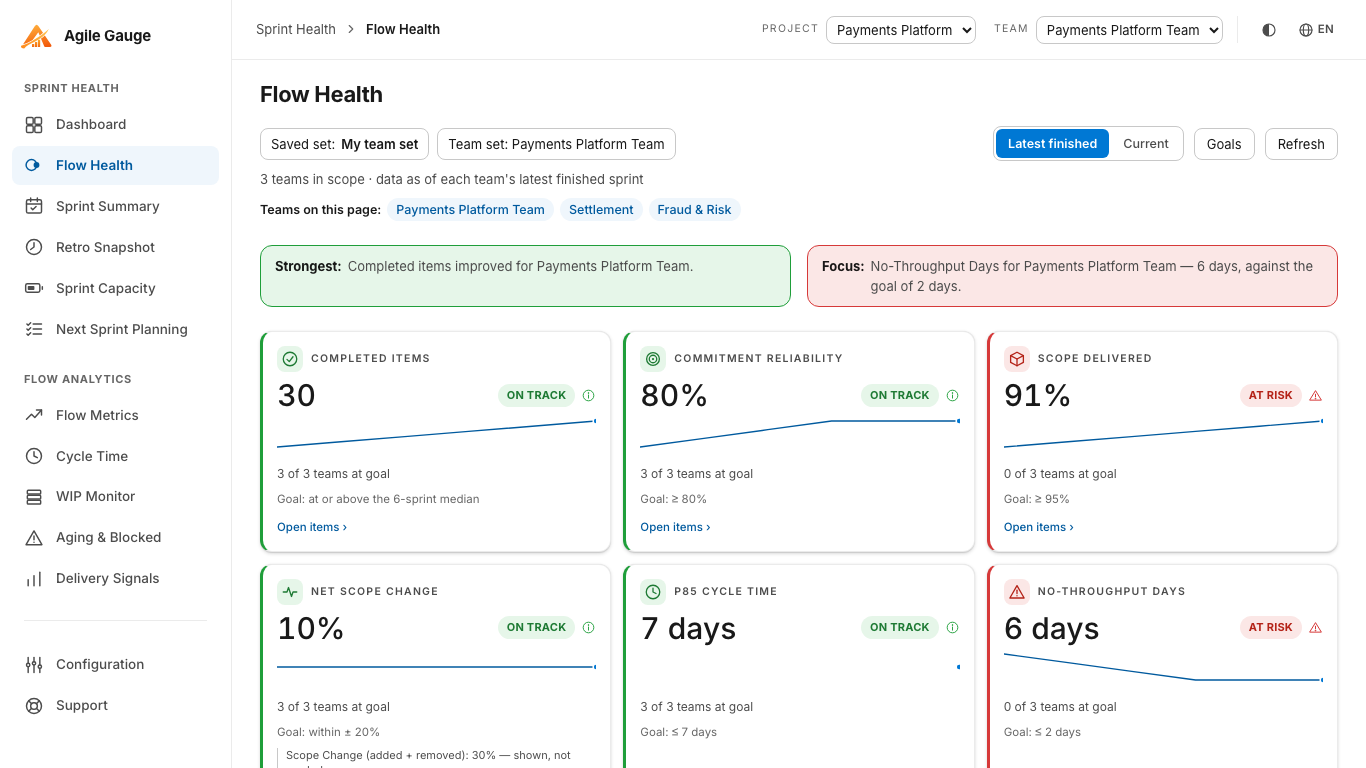
Across several teams: Flow Health's Sprint Commitment KPI
For anyone comparing more than one team, Agile Gauge's Flow Health view grades Sprint Commitment as one of six independent KPIs across a named team set, with no blended overall score sitting on top of it. Each team lands on its own status against a default goal of 80% or better, and the tile carries a plain sentence like "3 of 6 teams at goal" rather than a single number that hides which teams are actually struggling. Clicking the tile opens the exact items behind the figure for whichever team you want to check.
One team, one sprint: the same number in Sprint Summary
When the conversation is about one specific sprint rather than a set of teams, Sprint Summary shows the identical calculation as a Commitment reliability stat card, next to Carryover, Scope Change, and cycle time for that same sprint. Items removed from Azure DevOps entirely are excluded from both sides of the ratio, so a team is neither credited nor penalised for work the business withdrew, and an item still counts as delivered if it closed up to 24 hours after the sprint's own end: most teams close out the last item or two the morning after review, and that grace period keeps the number from punishing normal sprint-boundary timing.
What it looks like when there's nothing honest to show
If neither the direct history nor the reconstruction can establish a real day-one snapshot for a sprint, commitment reliability and carryover are not drawn at all: a panel explains why instead. The alternative would be treating the sprint's current membership as "committed," which makes reliability read close to 100% and carryover close to 0% no matter what actually happened during the sprint. A missing number is a more honest answer than a flattering one built on a bad assumption.
A number that can be gamed if you only look at it alone
Say/do ratio has a well-known weakness: a team that wants a flattering number can simply commit to less than it expects to deliver, and then look reliable every sprint without actually changing anything about how it works. Commitment reliability alone cannot tell a genuinely improving team from a sandbagging one: it needs company. Reading it alongside Scope Delivered (how much of everything finished, planned or not, shipped this sprint) and Net Scope Change tells the difference: a team that under-commits on purpose tends to show a lot of "extra" scope delivered beyond what it originally planned, which is a different pattern from a team whose planning is genuinely tight. Flow Health shows both figures side by side for exactly this reason, rather than presenting Sprint Commitment as a number that can be read in isolation.
Setting a goal your team actually agreed to
The 80% default is a starting point, not a target anyone has necessarily agreed to. Every KPI Flow Health grades, Sprint Commitment included, has an editable goal per named team set, set from Flow Health's own Goals panel and shared automatically with Retro Snapshot for any sprint viewed under that set. A team that wants a stricter or looser bar than 80% can set one, and duplicating a set before changing its goals is a quick way to try a different threshold without disturbing what everyone else is looking at.
Getting there
Sprint Commitment reliability needs your team's workflow-stage mapping set in Configuration, so Agile Gauge knows which states count as done. Comparing it across teams also needs a named team set: a saved list of up to 12 teams that Flow Health and Retro Snapshot can both pick from. Once both are in place, the number is read live every time either screen is opened.
Agile Gauge starts at $20 a month for up to 2 users. Start a 14-day free trial: full features, no card required.