A sprint rarely comes apart because of one dramatic problem. More often, one or two items get stuck early, waiting on another team, waiting on a decision, waiting on an environment, and nobody says so out loud until the sprint review, by which point three days of the sprint have already gone by with nothing to show for them. The board technically had the answer the whole time; the item was sitting there, aging, arguably flagged blocked. It just was not the thing anyone was looking at during stand-up.
What the view actually shows
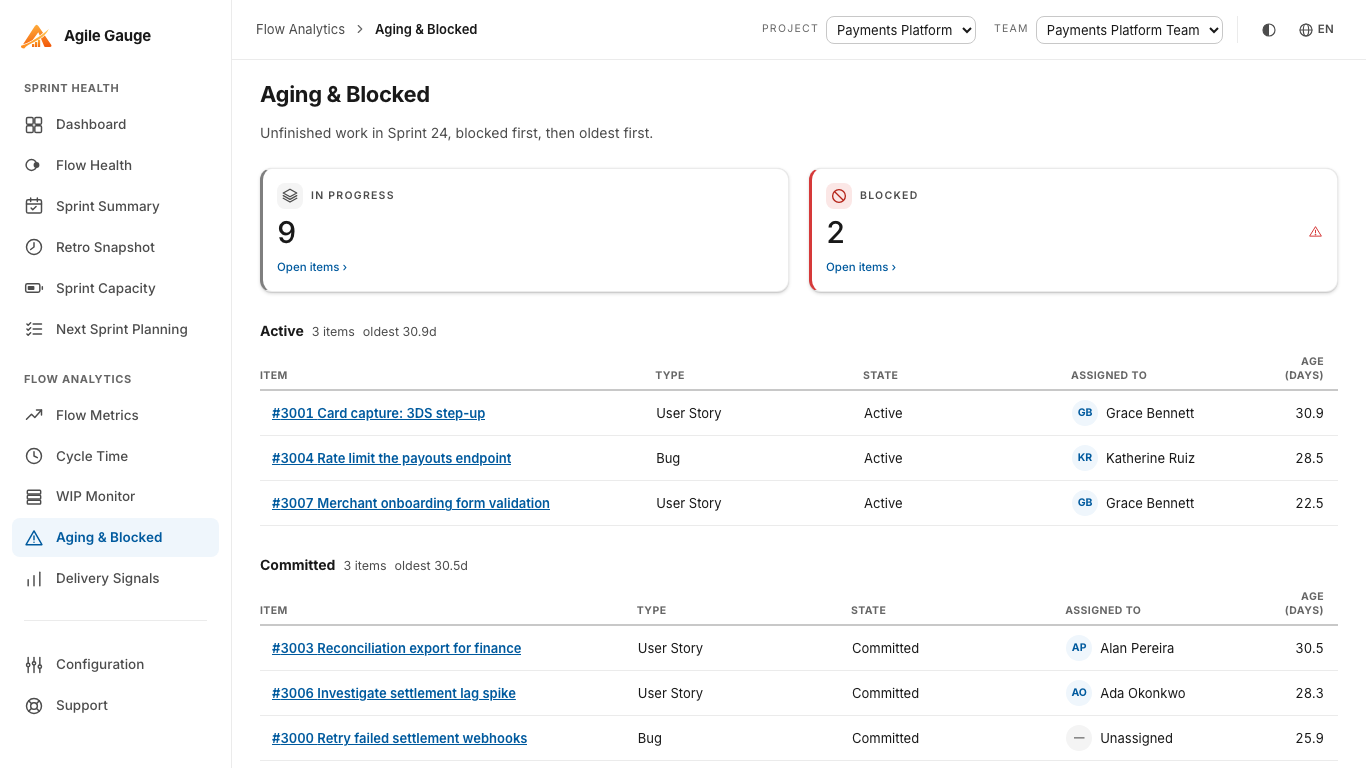
Agile Gauge's Aging & Blocked view answers a narrow question on purpose: of everything this team currently has unfinished, what's stuck, and what's been running the longest? It shows two headline figures, In flight (total unfinished items) and Blocked (how many of those are currently flagged), followed by a table of every unfinished item in the team's active sprint: item, type, state, assignee, a Blocked badge where it applies, and age in days. If nothing is in progress, whether because there is no active sprint or because the active sprint is genuinely empty, the view says so plainly rather than showing an empty table with no context.
What actually counts as "started"
Only items that have genuinely started show up here: the same in-progress definition WIP Monitor uses, meaning a real work-start signal such as a mapped in-progress transition or an Activated Date. An item created and parked in the sprint but never touched does not count as aging in the way this view means it; the list is about work that began and then stalled, not a backlog waiting for capacity.
What counts as blocked
Three signals are checked: the item's state name (matched against "blocked," "on hold," "impediment" and their Spanish, Portuguese and Italian equivalents, plus anything your organization has added), a tag on the item, or a whole-word match for "blocked," "impediment," or "on hold" in the title. Two further signals exist in Configuration, a custom Azure DevOps field, and a board column, but this specific view does not check either of them; if your organization relies on one of those two instead, a warning strip at the top of the page says so, rather than silently under-reporting how much is actually blocked.
Age with no cap and no rounding tricks
Age is a plain elapsed-time calculation, calendar days, not working days, from the same start point Cycle Time uses, shown to one decimal place. There is no cap on how large that number can get: a genuinely multi-year-old item shows its true, very large day count instead of being quietly excluded as an outlier, because a stuck item that has been sitting for that long is exactly the kind of thing this view exists to surface, not hide. The same start point Cycle Time uses means an item's age here and its eventual cycle time, once it finally finishes, are guaranteed to agree: nobody has to reconcile two different numbers for the same item.
Sorting for the conversation, not the spreadsheet
Blocked items are grouped first, then within each group, blocked or not, sorted oldest first. That ordering is deliberate: the items most worth raising in a stand-up or a retro are the ones that are both stuck and have been stuck the longest, and they should be the first thing anyone sees when the page loads, not something to go hunting for by sorting a column manually.
Known limits
Aging & Blocked is scoped to the team's current active sprint only: there is no view across a whole backlog or across past sprints, and no fallback to a previous sprint if none is currently active. Only three of the five blocked signals Configuration supports are checked on this view (state, tag, title: not a custom field or board column); the warning strip covers that gap when it applies. There is no working/calendar-day toggle, no age-based colour banding, and no CSV export here. Every item's name links straight into Azure DevOps, but the view itself does not link onward to Configuration or any other Agile Gauge screen.
Using it where it matters
This view is built to be opened during the sprint, not just written up afterward: a quick check before stand-up turns "anything blocked?" from a question someone has to think about into a table someone can just read off. Catching a blocked item on day two of a five-day stall is a meaningfully different conversation than catching it in the retro after the sprint is already over, because there are still days left in the sprint to actually do something about it.
It is also a useful screen to open before committing to next sprint's plan, not just during the current one. An item that has been sitting blocked for most of the current sprint is a reasonable candidate to either resolve before it carries over again or to flag honestly as unlikely to move without outside help: either decision is better made with the age and blocked status in front of you than by guessing from memory which items have been stuck the longest.
Agile Gauge starts at $20 a month for up to 2 users. Start a 14-day free trial: full features, no card required.